I Built My Own Music Mode on Linux, and Now I Want to See What Else I Can Make
Building My Linux Creative Workspace | Part 1

I've been wanting to make my Linux desktop feel more like something I built instead of something I just configured. I'm currently using KDE Plasma, but eventually I'd like to try a tiling window manager. I also want to get better at using my keyboard instead of reaching for the mouse all the time.
Rather than spend forever customizing KDE, I figured I'd start building things I could eventually take with me to another setup. One of those ideas was something I started calling Music Mode.
The idea was pretty simple. I wanted to run one command and have Spotify, an audio visualizer, and an old-school cartoon automatically open in their own spots on my desktop. Basically, my own little music workspace. I thought it would be cool.
I had no idea how much I was about to learn just trying to make three programs cooperate.
It Started With Three Programs
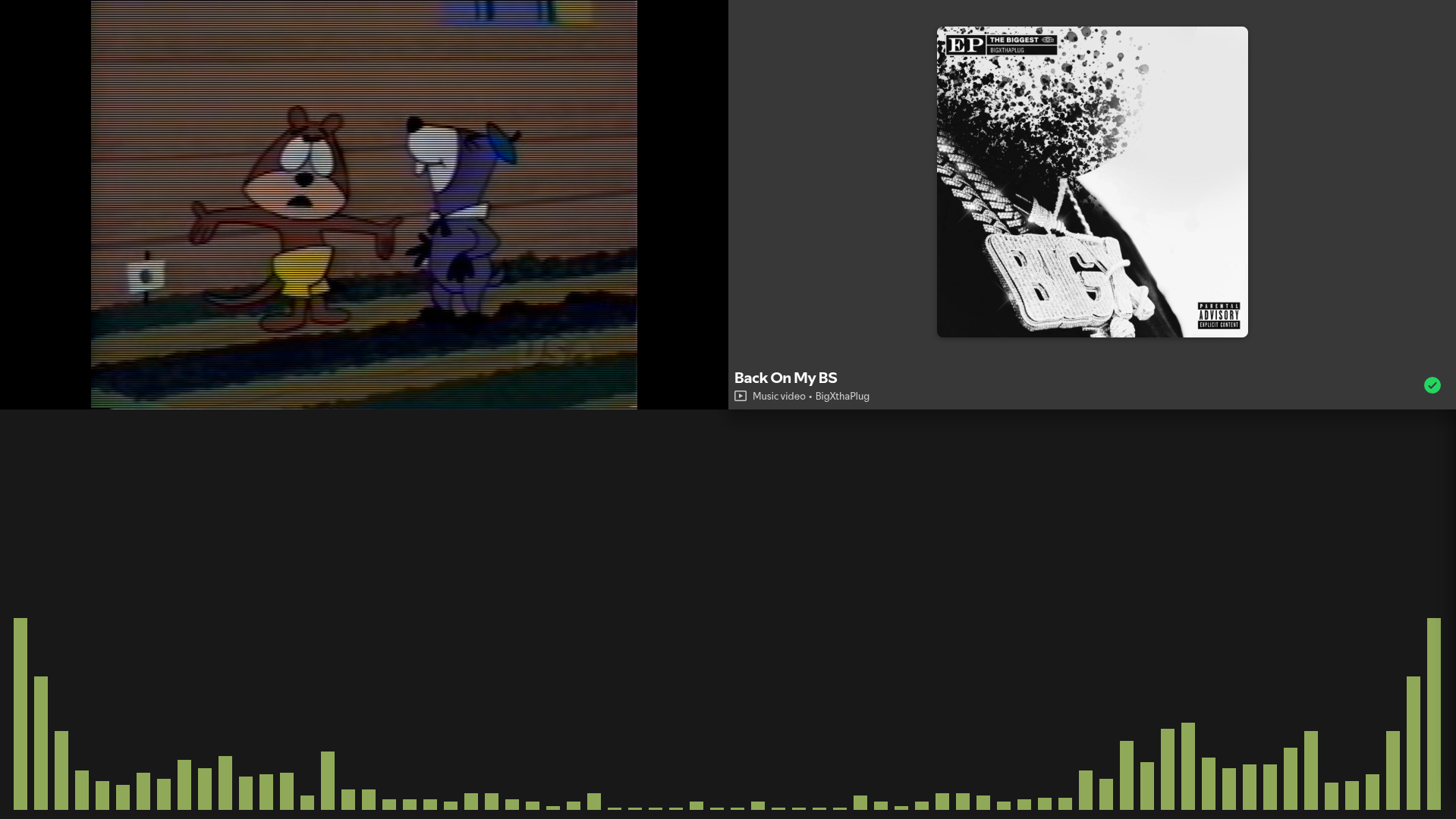
For the first version, I kept things simple. I used Spotify for music, CAVA for the audio visualizer, and mpv to play old cartoons without sound. I wrote a Bash script to launch all three.
The first time I ran it and everything opened together, I thought it was awesome. It wasn't anything complicated yet, just three programs opening from one command, but it was something I never thought I'd be doing in Linux.
I wasn't just changing settings anymore. I was starting to make my computer do something I'd imagined. Then I wanted the windows to go exactly where I wanted them, because apparently getting three programs to open wasn't enough. I needed them to behave, too.
The Window That Almost Made Me Quit
I wanted CAVA across the bottom of part of my screen, with the cartoon TV sitting above it. Using KDE's window rules, I got CAVA positioned automatically. I ran Music Mode, and the visualizer went straight where it belonged.
That was probably one of my favorite early moments. No dragging windows around. No resizing them every time. Just run the command and there it was.
Naturally, I figured the cartoon window would be just as easy.
It wasn't.
mpv kept opening too big, overlapping CAVA, or refusing to stay the size I wanted. At one point I remember thinking, “Fuck, why is this taking way longer than CAVA?” I was getting frustrated enough that I almost gave up for the night.
Eventually, we figured out that mpv was handling the video shape and the window shape differently. Once we got those settings working together, the window finally stayed where it belonged.
When I ran Music Mode and everything appeared in the right place, I was overjoyed. I know it wasn't the hardest thing anyone's ever done with Linux, but it felt like I'd conquered something. I'd pictured a layout in my head, and now my computer was actually doing it.
Then I Wanted a Real Cartoon TV
The cartoon was always supposed to be more than a video playing in a corner. I grew up in the '90s, and I missed that feeling of turning on the TV and landing in the middle of whatever happened to be playing. You didn't pick the exact episode or decide where to start. You just watched what was on.
I wanted to recreate a little of that feeling. Instead of starting the same cartoon from the beginning every time, I wanted my TV to pick something random, jump into the middle, play for a while, and then change channels. Sometimes it would flip quickly. Sometimes it would stay for a few minutes. Every once in a while, it would play the rest of the cartoon.
And I didn't want to control any of it. That was the point.
Getting the videos to change inside the same window took some work. We had problems with multiple mpv processes running, windows disappearing, and videos not switching correctly. There were also plenty of little mistakes with paths, quotes, and commands.
Eventually, I watched one cartoon change to another without the TV window moving. Then we got it changing automatically. I remember the first time a cartoon ended, another one loaded, and the whole thing kept going without me touching anything.
“FUCK YAAA! We did it!”
The funny part was that I went to take a break, and while I was gone it changed cartoons again. Coming back and seeing that little TV doing its own thing was different from watching a successful test. It was starting to become exactly what I'd imagined.
Making It Look Like the TV I Remembered
Once the channel switching worked, I wanted to add the finishing touches: TV static between channels, CRT scanlines, that old television look. I was expecting another late-night debugging session.
But by this point, I'd changed how I was approaching the project. Earlier, I'd been trying really hard to understand every little piece of code before moving forward. I was spending so much time troubleshooting that something I started for fun was becoming stressful.
So I gave myself some leeway. I started letting AI handle more of the technical work while still having it explain what we were doing, and things became a lot more enjoyable.
Seeing the static and CRT effect working was a huge moment for me. I've always liked the idea of having a TV running in the background, almost like something you'd see in an old hacker movie. It was the kind of thing I imagined having when I was a kid. Now I was actually making one.
I even left the TV running overnight to see what would happen. I half expected to come back to a frozen screen or some weird error, but the next day, it was still running. It had been changing cartoons on its own for hours.
“NO WAY.”
That was when I started thinking this could eventually become more than something on my desktop. What if I put it on a Raspberry Pi, gave it a small screen, and built a little 3D-printed '90s television case?
Just a tiny TV sitting on a shelf, changing cartoons by itself. A completely unnecessary gadget. Which, naturally, means I really want one.
The Cherry on Top
There was one last thing I wanted Music Mode to do. When I paused Spotify, I wanted everything to stop. Not just the music. CAVA should freeze. The cartoons should pause. Even the countdown deciding when to change channels should stop.
When I pressed Play again, everything should pick up where it left off. That was really the whole point of Music Mode from the beginning: getting these different programs to work together.
We added a controller that checks Spotify's playback status and tells the other programs what to do. Then we tested it.
I paused Spotify. Everything stopped. I pressed Play. Everything started moving again.
Man, that was the cherry on top!
We even tested the channel timer. We let it run, paused Spotify, waited longer than the countdown should have lasted, and confirmed it hadn't changed channels. When we resumed the music, the countdown eventually finished and the TV switched.
That was it. Music Mode was doing what I'd originally wanted. And the more I watch it run, the more ideas I get for making it better.
I already want CAVA to match my operating system's color palette. I'm also thinking Spotify's mini-player might fit nicely in the empty space in my layout. Apparently finishing a project is a pretty effective way to come up with more projects.
What I Actually Learned
The biggest thing I learned wasn't one specific Linux command. It was realizing how much you can do by connecting programs that already exist.
We didn't build Spotify. We didn't build CAVA or mpv. Those programs already did what we needed. We just figured out how to string them together to make something different.
You don't have to reinvent the wheel when you've already got everything you need right there.
The other big lesson was about using AI. Before, I'd get stuck on something and start searching for answers. Sometimes I'd spend so long looking that I'd forget what I was originally trying to figure out. It was frustrating.
With AI helping me, I had something that could point me toward what to check and explain how to troubleshoot it. And because we were documenting the project as we went, I had two ways to get back on track.
I could ask AI what we'd done, or I could go through the notes and see the actual steps, problems, and fixes. I wasn't worried about stopping for the night or forgetting everything by the next day. That made a bigger difference than I expected.
I still want to learn how things work. There are parts of this project I don't completely understand yet, and I'm okay with that. The code is there. The documentation is there. I can go back and learn more whenever I want.
For now, I'd rather keep building things that make me excited to learn than turn every experiment into homework.
There Hasn't Been a Better Time to Be an Idiot With an Idea
I've been thinking about this quote for a while: “There hasn't been a better time to be an idiot with an idea.” And after building Music Mode, I believe it even more.
I didn't start this project knowing how to get Spotify, CAVA, and a window playing cartoons to work together. I just thought it would be cool if they did.
A few years ago, I probably would've spent hours searching for answers, gotten frustrated, and eventually moved on to something else. This time, I had AI helping me figure out what to do next, documentation to help me remember what we'd already done, and a bunch of programs that already did most of what I needed.
And that's what I find so exciting about technology right now. You don't have to know how to build everything before you start. You can have an idea, start experimenting, learn along the way, and end up with something that actually works.
Music Mode started as a random idea for my desktop. Now it's something I use, something I built, and something I already want to improve. Maybe that's the whole point.
You don't have to be an expert to start making things. You just have to be willing to try.
Build Your Own Music Mode
I built mine on Linux using Spotify, CAVA, mpv, and a few scripts, but you don't have to use the same programs or even the same operating system.
If you want to try making your own Music Mode, copy this prompt into your favorite AI assistant and see what you can come up with.
Copy this prompt:
I want to build my own Music Mode for my computer.
The idea is to launch a personalized music workspace with one command or keyboard shortcut.
I'd like it to include:
- My favorite music player.
- An audio visualizer that reacts to the music.
- A video, animation, or something interesting playing in the background.
- A layout that automatically puts everything where I want it.
- If possible, everything should pause and resume when I pause or play my music.
I want to make this work with the operating system and programs I already have.
Start by asking me what operating system I'm using, what music player I prefer, and what I'd like my workspace to look like.
Help me find existing tools that can work together instead of building everything from scratch.
Let's start with the simplest working version and improve it from there.
Please guide me one step at a time. Explain what we're doing in simple language, and wait for me to finish each step before moving on.
If something doesn't work, help me figure out why. Don't make changes to my system without explaining them first.
Help me document what we build so I can understand it later, troubleshoot problems, and keep improving it.
I don't need to understand every line of code right away. I want to learn as we go and have fun building something that feels like my own.
You don't need to start with something complicated. Start with a few programs you already use and see what happens when you bring them together.
As for me, I'm not quite done experimenting. Next I want to give my little Retro TV its own standalone version, separate from Music Mode.
After that, I want to see if I can turn it into a physical gadget with a Raspberry Pi, a screen, and a 3D-printed case. What started as a cartoon playing in the corner of my desktop has turned into something I never expected.
And now I want to see how far I can take it.
If you want to see how I built my version, you can check out the project on GitHub.